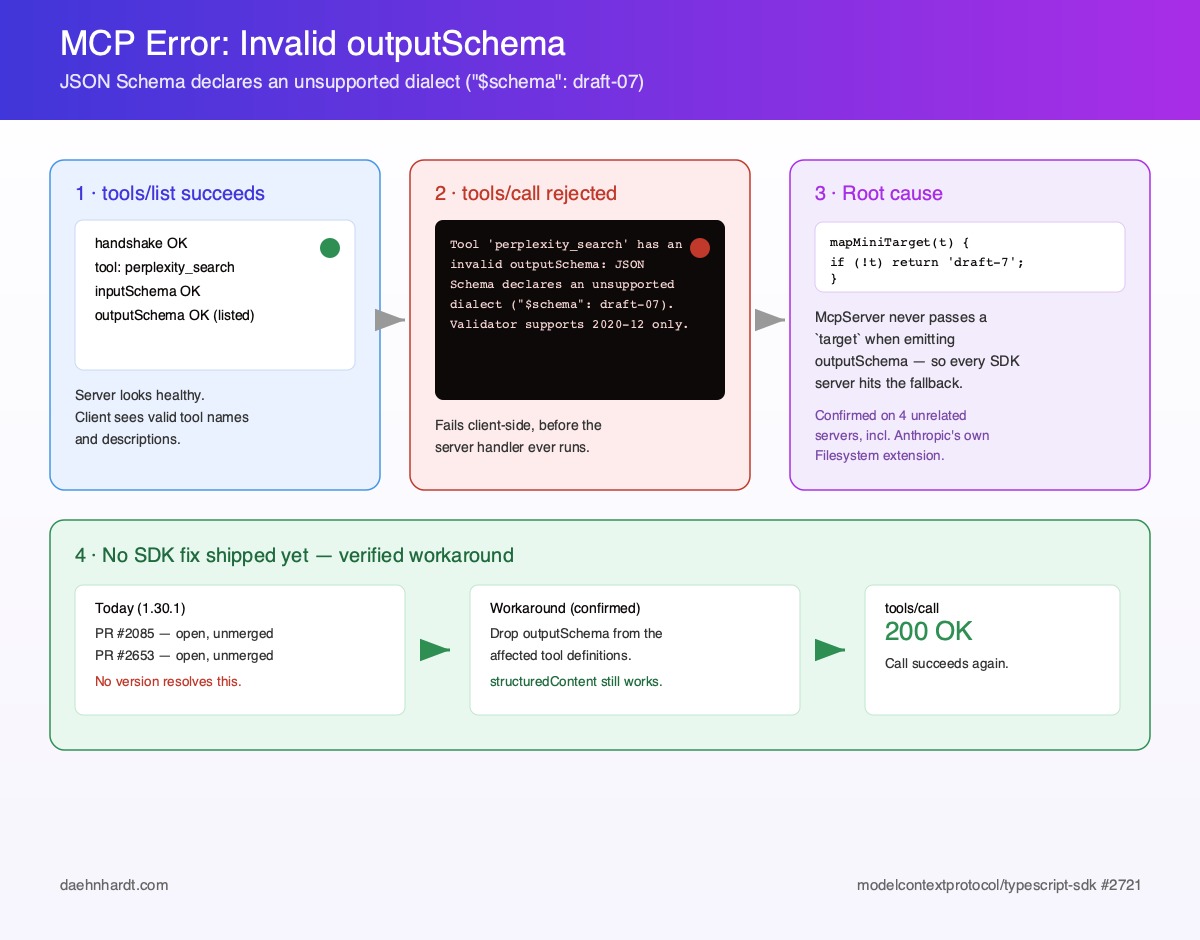
The "invalid outputSchema: JSON Schema declares an unsupported dialect" error is a client-side schema validation failure: a strict JSON Schema 2020-12 validator (Claude Desktop, for example) refuses a tool whose `outputSchema` declares `"$schema": "http://json-schema.org/draft-07/schema#"`. `tools/list` succeeds; `tools/call` fails.
The cause is in `@modelcontextprotocol/sdk` (TypeScript, 1.30.1 and earlier): `McpServer` never passes a `target` when converting Zod schemas, and `mapMiniTarget()` falls back to `draft-7`, so every `inputSchema` and `outputSchema` is stamped draft-07.
No released SDK version fixes it yet — PR #2085 and PR #2653 are still unmerged, and issues #2721 and #2084 are open.
Workaround 1: remove `outputSchema` from the tool and keep returning `structuredContent` (valid per the MCP spec); validate the result with Zod yourself, because the SDK stops doing it.
Workaround 2: use `patch-package` to change the `mapMiniTarget()` fallback to `draft-2020-12` (Zod v4), or to strip the `$schema` line in the Zod v3 branch, until a fixed release ships.
Verify in one line: `npx @modelcontextprotocol/inspector --cli node dist/server.js --method tools/list | grep '\$schema'` shows which dialect your server emits.
MCP Error: Invalid outputSchema, JSON Schema Declares an Unsupported Dialect
If you build or run an MCP server on the MCP TypeScript SDK (@modelcontextprotocol/sdk; new to MCP? Start with A Gentle Introduction to MCP) and one of its tools declares an outputSchema, there is a good chance a client somewhere is quietly rejecting every call to it. The tool shows up fine in tools/list. The server logs look healthy. And then tools/call fails with this:
Tool 'perplexity_search' has an invalid outputSchema: JSON Schema declares an
unsupported dialect ("$schema": "http://json-schema.org/draft-07/schema#").
The default validator supports JSON Schema 2020-12 only.
Swap the tool name and it is the same story everywhere: Perplexity’s official MCP server hits it on all four of its tools, and — a bit awkwardly — so does the reference @modelcontextprotocol/server-filesystem running inside Claude Desktop. This is not one server’s bug, so there is no point hunting for it in yours.
The “unsupported dialect” error is a client-side schema validation failure: the client refuses to trust a tool’s outputSchema — the optional JSON Schema describing the tool’s structuredContent result — because its $schema names a JSON Schema dialect (draft-07) that the client’s validator does not support.
The server hands over a draft-07 outputSchema and tools/list looks healthy; the strict client only rejects it when tools/call runs.
In other words, nothing is wrong with the listing step or with your handler. The failure sits in the gap between the two calls, where a 2020-12-only client validator meets the draft-07 $schema label the SDK stamped on the outputSchema.
The cause, how to check which dialect your server emits, the SDK status and two workarounds follow below.
References
🔒 Subscribe to keep reading.
You've hit a Deep Dive tutorial.
I spend dozens of hours researching, coding, and breaking things to write these guides. This content is free, but reserved for my subscriber community. Drop your email below to unlock this guide (and all past/future deep dives):
Full content temporarily unavailable — refresh in a moment
You're in
I'll send weekly notes on AI tools, Python, and what I'm actually building. Check your inbox for Set a password to unlock articles — the form does not log you in.
New subscribers get an inbox mail: Set a password to unlock articles. The form does not log you in — use the same email afterwards.
References
About Elena
Elena, a PhD in Computer Science, simplifies AI concepts and helps you use machine learning.
Citation
Elena Daehnhardt. (2026) 'MCP Error: Invalid outputSchema, JSON Schema Declares an Unsupported Dialect', daehnhardt.com, 27 September 2026. Available at: https://daehnhardt.com/blog/2026/09/27/mcp-error-invalid-outputschema-json-schema-declares-an-unsupported-dialect/
I'll send weekly notes on AI tools, Python, and what I'm actually building. Check your inbox for Set a password to unlock articles — the form does not log you in.