Introduction
It’s easy to ask a coding agent to clean up a set of landing pages. It can refactor components, rewrite copy, change headings and update metadata in one pass.
The problem is that it usually has no idea which of those pages bring in traffic.
A page might look repetitive in the code and still rank for a useful set of searches. An agent can remove the bits that make it useful to visitors, or change the canonical URL, while producing a perfectly valid build.
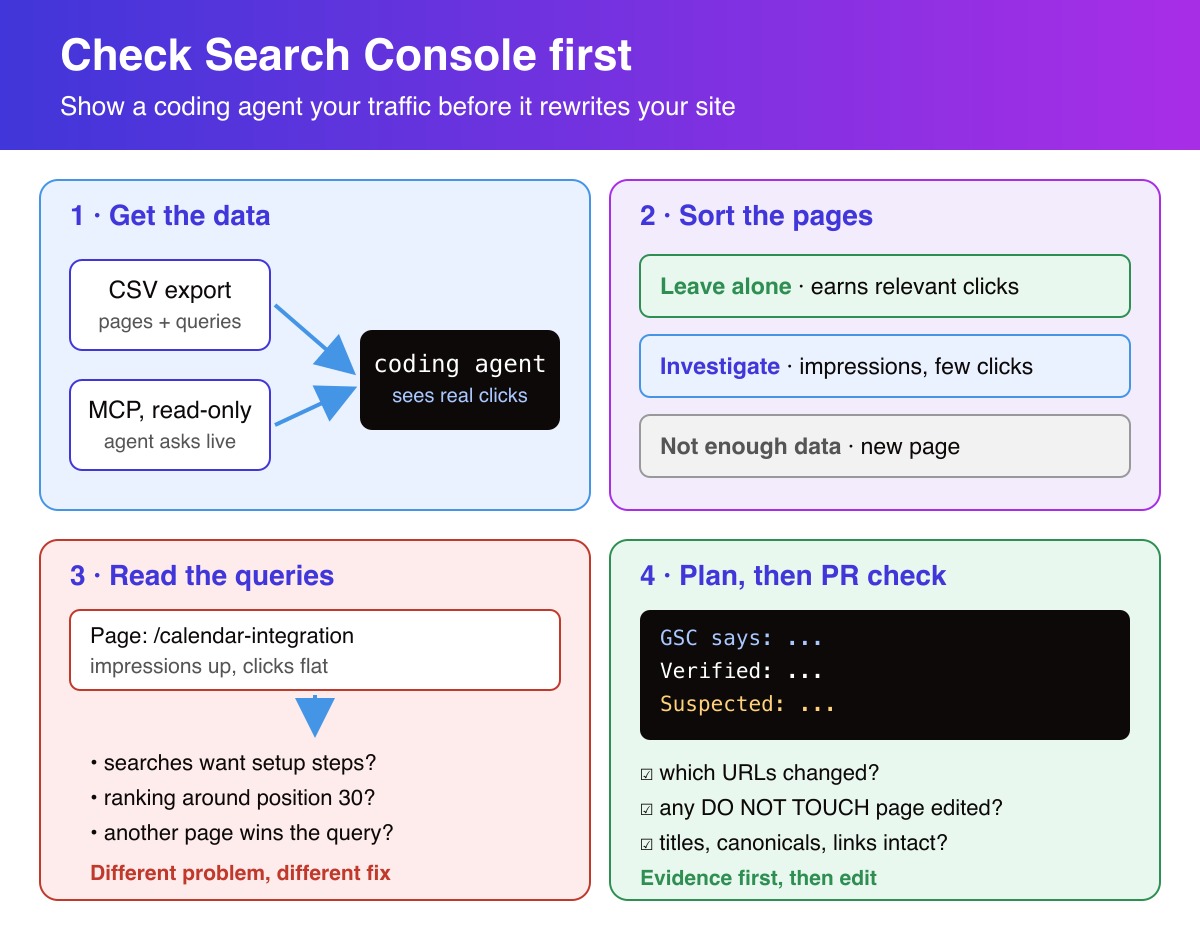
Before asking it to work on SEO, give it some Google Search Console data. You can export CSV files every few weeks. You can also connect Search Console through MCP and let the agent query it directly. Both work.
What matters more is giving the agent a list of pages it should not casually rewrite.
First, find out what’s working
Start with the Search Console Performance report. Look at pages, queries, clicks and impressions over a consistent period. Compare with the previous period if the site has enough history.
I find it useful to sort pages into three buckets:
| Category | Why it’s there | What to do |
|---|---|---|
| Leave alone | Already gets relevant organic clicks, with no obvious problem | Avoid changes to copy, headings, titles, canonicals and internal links without a specific reason |
| Investigate | Gets impressions but few clicks, or has lost traffic | Check its queries and the actual page before deciding what to change |
| Not enough data | New page or very little search activity | Check basic technical SEO, but don’t pretend GSC has told you what the problem is |
These aren’t automatic rules. A page with good traffic can still have a bug. A page with low CTR might simply rank too far down for a title change to make a difference.
The first category is especially important when you use coding agents regularly. You can improve five weak pages and still lose traffic overall if the same commit breaks one page that was doing well.
Also check shared components. A change to a navigation menu, page template or canonical helper can affect pages the agent never opened directly.
Getting the data into your coding workflow
The simple option: CSV exports
You don’t need a custom integration.
In Search Console, open the Performance report, select a date range and export the data. Keep the period and search type consistent each time. Store the files somewhere the agent can read:
seo-data/
  pages-2026-09.csv
  queries-2026-09.csv
  pages-2026-10.csv
  queries-2026-10.csv
These filenames are examples. Use reporting periods with finalized data, and record the exact dates.
There is one detail worth getting right: a site-wide list of queries and a site-wide list of pages do not tell you which queries belong to which page. If you’re investigating a specific URL, filter the report to that page and export its queries. The Search Analytics API can also return page and query dimensions together.
CSV is a good fit for occasional reviews. You know exactly which data the agent used, and you can keep a copy with the pull request. You just have to refresh it yourself.
The other option: MCP
Disclosure: I am the founder of AskGSC, a Search Console MCP service.
If you do this frequently, connecting Search Console through MCP saves the manual exports. A compatible coding agent can request the queries for a URL, compare date ranges and check other pages as it works.
It also introduces credentials and permissions, so keep the connection read-only and don’t put tokens in the repository.
Don’t optimize a page until you’ve checked its queries
Imagine a page about a calendar integration. It has impressions but hardly any clicks.
That alone isn’t a reason to rewrite its title.
Look at the queries for that URL. Maybe people are searching for setup instructions and the page doesn’t show how to configure anything. Maybe it ranks around position 30 for the relevant terms. Maybe a different page on your site is showing up for the same searches.
Those are different problems. They need different fixes.
Once you’ve checked the queries, ask the agent to inspect the relevant route and rendered HTML. The title, H1, canonical, internal links and actual page content matter more than a generic SEO score.
I use a prompt along these lines:
Use the attached Search Console exports, or the connected GSC
tools if available.

Compare the last two complete 28-day periods for Web search.

Before suggesting changes:
- List pages with meaningful, stable organic clicks.
  Mark them DO NOT TOUCH unless you find a specific issue.
- Find pages and queries worth investigating.
  Use page-specific query data, not a guess based on
  separate site-wide exports.
- Inspect the relevant code and rendered output.
- Show which URLs each proposed change could affect.

For each recommendation, separate:
1. What Search Console actually reports
2. What you verified in the code
3. What you suspect but haven't proved

Don't edit anything yet. Show me the plan first.
The useful part isn’t the wording. It’s forcing the agent to show evidence before it starts modifying files.
The part people forget: protect your existing traffic
Say you’re consolidating several landing-page templates. The agent notices duplicated copy and replaces it with a shared introduction. It also simplifies the heading structure.
The site builds. The pages look fine. You merge.
But a couple of those pages were already bringing in qualified visits, and their page-specific content has disappeared.
You won’t catch that with a passing build or TypeScript tests.
Here’s what I’d check before merging a PR that changes public pages:
- Which URLs changed, including through shared components?
- Are any of them on the DO NOT TOUCH list?
- Did their titles, headings, canonical URLs, content or internal links change?
- Are redirects, status codes and sitemap entries still correct?
- If a protected page changed, was that intentional and reviewed?
You can automate most of the checks against the rendered site. The decision to rewrite a page that’s already working should still be deliberate.
A short note in the PR is enough:
PR: Refactor integration landing pages
Affected: /integrations/*
GSC periods: two complete 28-day windows
Protected: /integrations/calendar, /integrations/crm
Checked: canonical URLs, H1, unique copy, internal links
Decision: refactor OK; leave both protected pages unchanged
SEO impact: not measured yet
Those URLs are examples, not real audit results.
Don’t ask GSC to prove more than it can
Search Console is useful, but it has limits.
- Average position isn’t a fixed Google ranking. It varies with the queries, countries and devices in the report.
- Not every query appears in exports. Some queries are anonymized, and reporting limits apply.
- A traffic drop after a deploy doesn’t prove the deploy caused it.
- A newly published page may not have enough data to draw conclusions.
- GSC doesn’t tell you whether the code you deployed is technically correct. Check HTTP responses and rendered output yourself.
For comparisons, always keep the dates, search type and dimensions alongside the numbers. Otherwise the next agent session may compare two reports that were never comparable.
Conclusion
If an agent has access to your repo but no search data, it can make confident changes to pages it doesn’t understand.
Give it CSV exports or an MCP connection. Use the data to find relevant queries, investigate pages that need work and identify the ones that already bring traffic.
Before merging, check what changed on those pages.
There’s nothing wrong with letting an agent write most of your site’s code. Just don’t let a routine refactor wipe out the organic traffic you’ve already earned.
References
Stay Ahead in AI, Machine Learning & Python
No hype. Weekly notes on AI tools, Python, and what I'm actually building — plus seven free gifts, including Fantastic AI: The 2026 Toolkit and Git Commands and Contribution Workflow Cheatsheet.

You're in
Check your inbox for Set a password to unlock articles if you want gated tutorials. Log in with the same email.