Elena' s AI Blog

How AI Skills Turn Workflows into Reusable Instructions

10 Jun 2026 (updated: 10 Jun 2026) / 20 minutes to read

Elena Daehnhardt


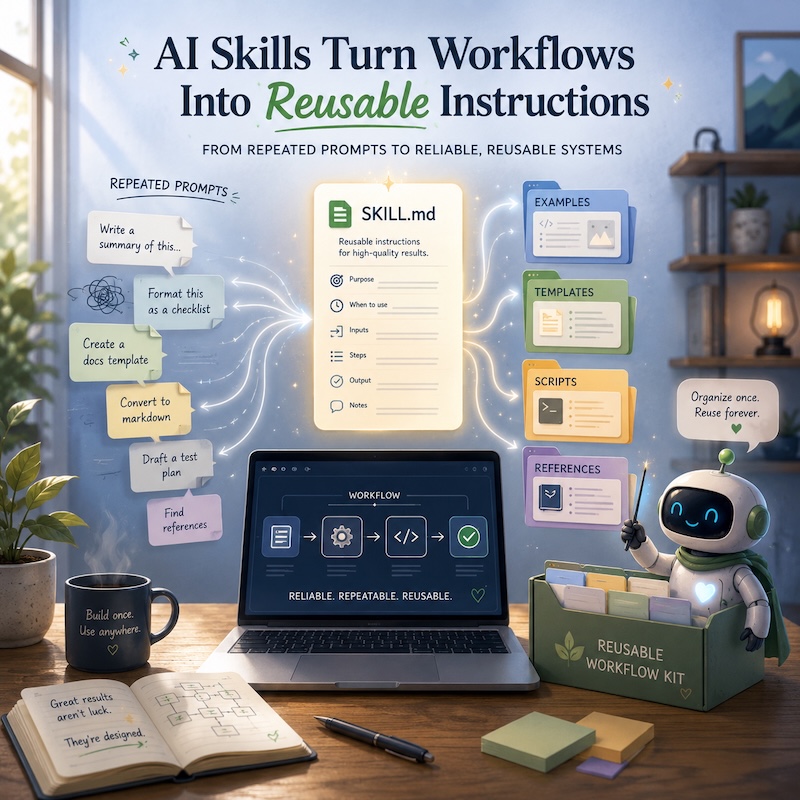
ChatGPT-5.5 Thinking / DALL·E: AI skills turning repeated prompts into reusable workflow instructions. Prompt: Create a lovely square editorial illustration for a blog post about AI skills turning workflows into reusable instructions, showing a warm developer workspace, a friendly AI assistant, a central `SKILL.md` card, and reusable workflow cards organised from repeated prompts.


TL;DR:
  • - AI skills are portable workflow packages (a SKILL.md plus supporting files) that teach an AI how to perform a specific recurring task consistently — think mini operating manuals, not prompts.
  • - Keep skills small and specific; one giant catch-all skill dilutes attention and wastes tokens ("context rot").
  • - Skills handle repeatable judgement (how to think); MCP tools handle repeatable actions (what to do) — together they form a reliable automation layer.

I noticed something odd while working with AI coding agents: I was not only prompting them. I was slowly teaching them my habits.

How I review Python snippets. How I prepare a newsletter. How I want blog posts to sound. How I prefer Markdown to be preserved. How I check that an AI has not enthusiastically “improved” something that was already fine.

At some point, repeating those instructions stopped feeling like prompting and started feeling like maintaining tiny workflow manuals.

That is where AI skills come in.

Introduction

AI skills are reusable instruction packages for AI assistants and agents.

Think of them as a small “how we do this task” folder. Instead of pasting the same long prompt every time, you turn the workflow into a skill once, then the AI can reuse it when the task comes up.

A skill usually contains:

my-blog-newsletter-skill/
├── SKILL.md          # main instructions
├── examples/         # good examples
├── templates/        # output templates
├── scripts/          # optional helper code
└── references/       # style guide, rules, schemas, checklists

The important file is usually SKILL.md. It explains what the skill does, when to use it, what inputs are needed, the steps to follow, the output format, and final checks. OpenAI describes ChatGPT skills as reusable workflows for recurring tasks, and Claude/Microsoft use a very similar idea: folders of instructions, scripts, and resources loaded only when relevant. (OpenAI) (Claude Help Center) (Microsoft Learn)

Think of skills as the rung between one-off prompts and fully automated agent pipelines — the place where ad-hoc instructions graduate into something reusable, versionable, and eventually composable into larger workflows.

What problem do AI skills solve?

They solve the “I keep explaining the same thing again” problem.

For example, you might often ask an AI to:

“Please rewrite this in my blog style, use short paragraphs, add a practical example, keep the tone warm, preserve Markdown, avoid hype, add SEO title suggestions…”

That is a perfect skill.

Instead of repeating all that, you create a blog-post-polisher skill. Then you can simply say:

Use my blog polishing skill on this draft.

Or the assistant may detect it automatically, depending on the platform.

Skills vs prompts vs custom GPTs vs MCP tools

This is the clean mental model:

Thing Best for Example
Prompt One-off instruction “Summarise this article in 5 bullets.”
Custom instructions Always-on preferences “Use British English.”
Skill Repeatable workflow “Turn rough notes into a newsletter draft using my format.”
Custom assistant (Custom GPT, Gem) A specialised persona tied to a platform “My editorial assistant for AI blog posts” in ChatGPT or Gemini.
Custom agent A programmatic agent with tools and logic A multi-step agent that drafts, reviews, and publishes automatically.
MCP tool/server Giving the AI access to external systems Read files, update CSV tasks, query GitHub, fetch analytics.

A skill is not just a prompt. It is more like a mini operating manual for a task.

Microsoft’s Agent Skills docs describe them as portable packages of instructions, scripts, and resources that give agents specialised abilities. VS Code’s Copilot docs also distinguish skills from custom instructions: custom instructions are mostly coding guidelines, while skills can include scripts, examples, and reusable workflows. (Microsoft Learn) (Visual Studio Code)

Where can you find AI skills?

Not all sources carry the same weight. I think of them in two groups.

Official and high-trust starting points

ChatGPT skills (OpenAI): OpenAI’s Academy page explains skills as reusable workflows that guide ChatGPT through recurring tasks. A ChatGPT skill can include a SKILL.md file plus supporting resources like templates, examples, schemas, and brand guidelines. Once enabled, ChatGPT may use a relevant skill automatically, or you can invoke one explicitly with @skill-name, depending on workspace support. (OpenAI)

Claude skills (Anthropic): Claude skills are folders of instructions, scripts, and resources that Claude loads dynamically for specialised tasks. Anthropic ships built-in skills for document creation — Excel, Word, PowerPoint, PDFs — and supports custom skills for personal or organisation-specific workflows. (Claude Help Center) The anthropics/skills public repository currently contains 17 curated skills covering document creation, MCP development, frontend design, and team workflows. If you use Claude, start here.

GitHub Copilot / VS Code Agent Skills: VS Code supports Agent Skills for GitHub Copilot, working across Copilot in VS Code, Copilot CLI, and the Copilot cloud agent. Project skills live in .github/skills/ or .claude/skills/; personal skills live in ~/.copilot/skills/ or ~/.claude/skills/. (Visual Studio Code)

microsoft/skills: A public repository for coding agents covering skills, custom agents, AGENTS.md templates, and MCP configurations. The repo explicitly warns against loading everything — too many skills cause “context rot”: diluted attention, wasted tokens, and mixed-up patterns. Copy only the skills essential for the current project. Skills are seasoning, not soup. (GitHub)

Discovery and community sources

agentskills.io documents an open SKILL.md standard adopted by Anthropic, OpenAI, Microsoft, Google, and Cursor. A skill written to this spec works across 20+ agents without modification. Worth reading as a reference even if you only use one assistant today — the structure encourages portable, tool-agnostic thinking.

netresearch/claude-code-marketplace: A community-curated collection built on the agentskills.io standard, explicitly portable across Claude Code, Cursor, Copilot, Codex, and Gemini CLI. Good if you work across multiple tools.

SkillsMP indexes over 1.6 million community skills across multiple agents. Useful for discovery; quality varies considerably. Treat it as a catalogue to browse, not a source to trust blindly — read the SKILL.md, inspect any scripts, and prefer skills from maintainers you recognise.

If you only want one starting point: use anthropics/skills if you work primarily in Claude, or microsoft/skills if you work in VS Code or GitHub Copilot. Both are curated, maintained, and safe to copy from directly.

How to use AI skills effectively

The biggest trick: make skills small and specific.

Bad skill:

do-everything-for-my-blog

Better skills:

draft-ai-newsletter
review-guest-post
generate-pinterest-pin-text
create-markdown-image-caption

Each skill should answer these questions:

---
name: blog-post-polisher
description: Use this when improving a draft blog post while preserving the author's voice, Markdown structure, British English, and technical accuracy.
---

# Blog Post Polisher Skill

## Purpose

Improve a draft technical blog post without changing its core meaning.

## Inputs

- Draft Markdown text
- Optional target audience
- Optional SEO keyword
- Optional desired length

## Workflow

1. Read the whole draft first.
2. Identify the main idea and audience.
3. Preserve the author's personal, reflective style.
4. Improve structure, clarity, transitions, and examples.
5. Keep British English.
6. Avoid hype and generic AI phrases.
7. Preserve Markdown front matter, headings, links, and code blocks.
8. Add reader-inclusive touches where natural.
9. Suggest 3 possible titles if the existing title feels weak.

## Output

Return:

1. Short diagnosis
2. Revised draft
3. Suggested title options
4. Notes on what changed

## Final checks

- Does the post still sound like the author?
- Are technical claims clear and cautious?
- Are paragraphs short enough for mobile reading?
- Is Markdown preserved?

That is already a useful skill.

When should you create a skill?

Create a skill when the task is:

Repeated — you do it often. Structured — the steps matter. Style-sensitive — tone, format, or brand voice matters. Error-prone — the AI often forgets some requirement. Shareable — you want another tool, agent, or collaborator to follow the same process.

Do not create a skill for every tiny thing. If it takes one sentence to explain, a normal prompt is fine.

A good workflow for building your first skills

Start with the tasks you already repeat.

For my AI/Python blog, I started with these:

1. newsletter-draft-skill
2. blog-post-review-skill
3. pinterest-pin-copy-skill
4. image-caption-and-seo-filename-skill
5. guest-post-response-skill
6. weekly-ai-signals-research-skill
7. jekyll-markdown-quality-check-skill

Then test each skill with 3 real examples. If the output is wrong, do not just correct the answer. Correct the skill.

That is the real magic: skills become your editable workflow memory.

A real example: python-code-reviewer

You do not need a complicated skill to get value. Here is a real one from my publishing workflow.

I use python-code-reviewer before publishing any technical post with code. It catches broken imports, wrong output claims, and security slip-ups without touching a single word of prose.

python-code-reviewer/
├── SKILL.md
└── examples/
    └── bad-good-snippet.md
---
name: python-code-reviewer
description: Use this before publishing any technical post that contains Python
  code blocks. Reviews each snippet for correctness, completeness, security,
  and readability. Does not rewrite the post prose.
---

# Python Code Reviewer

## Purpose

Check every Python code block in a draft post before it goes live.

The goal is to catch bugs, missing context, security risks, broken examples,
and confusing snippets while preserving the author's style and structure.

## Inputs

- Draft post in Markdown
- Optional: target Python version, default: Python 3.11+
- Optional: whether snippets should be executable as standalone examples
  or may depend on earlier blocks

## Workflow

1. Locate all fenced Python code blocks in the draft.
2. For each block, identify:
   - Its approximate location, using the nearest heading or section title.
   - Whether it is standalone or depends on a previous block.
   - Whether it appears to be example code, production-style code,
     pseudocode, or partial code.
3. For each block, check:
   - All imports are present and correct.
   - Required setup is clear.
   - No placeholder functions remain, such as `pass`, `# TODO`,
     `implement_here()`, or fake ellipses unless clearly intentional.
   - Variable names are consistent within the block and across related blocks.
   - The stated output matches what the code would actually produce.
   - Exceptions and edge cases are handled where appropriate for the post's level.
   - No hardcoded secrets, tokens, passwords, private keys, or real email addresses.
   - No deprecated APIs for the target Python version.
   - No obvious security issues: unsafe `eval`, shell injection,
     unsafe deserialisation, or leaking credentials.
   - The code is readable for the post's target audience.
4. If code execution is available, run small self-contained snippets when useful.
   If execution is not available, clearly mark the review as static analysis only.
5. Report findings using severity levels:
   - **Critical:** code is wrong, unsafe, or likely to fail.
   - **Important:** code may confuse readers, miss required context,
     or behave differently than described.
   - **Minor:** readability or polish issue.
6. If a block is clean, confirm it with a single ✓.

## Output

Return:

1. A short audit summary.
2. A numbered list of findings by code block.
3. Corrected snippets only for blocks that need changes.
4. Optional notes for the author if something should be explained in prose.

The boring formatting rules below are not decoration. They are what make the result predictable enough to use before publishing.

Use this format:

```
## Python Code Review

Summary:
- Blocks reviewed: N
- Critical issues: N
- Important issues: N
- Minor issues: N
- Execution: static analysis only / executed
- Overall status: ready to publish / needs fixes

### Block 1 — <nearest heading or location>

Status: ✓ Clean

---

### Block 2 — <nearest heading>

Status: Needs changes

Severity: Important
Issue: Missing `import pandas as pd` at the top.
Why it matters: Readers copying the snippet will get a NameError immediately.
Suggested fix: Add the import, or note explicitly that it continues from Block 1.
```

## Do not

- Do not rewrite prose or restructure the post.
- Do not refactor working code into a "better" style unprompted.
- Do not add type hints unless the post already uses them.
- Do not change variable names unless they are genuinely misleading or inconsistent.
- Do not invent mock data structures that differ from the post's examples.
- Do not expand short teaching snippets into production frameworks.
- Do not mark partial code as broken if the surrounding post clearly explains
  that it is partial.
- Do not silently assume code was executed. Always state whether the review
  was static or executed.

To invoke it:

Use my python-code-reviewer skill on this draft. Target Python 3.12.

The Do not section does the real work. Without “do not mark partial code as broken if the surrounding post clearly explains that it is partial,” the reviewer flags every intentionally incomplete teaching snippet — which is most of them in a tutorial. A natural companion is a stricter python-code-executor skill that actually runs the snippets, captures output, and compares it against what the post claims. I keep them separate: the reviewer is a publishing safety check; the executor is a test harness.

Practical example: skill + MCP

This is where it gets especially interesting for my setup.

A skill can say:

When preparing the weekly newsletter, read the selected posts, preserve the newsletter format, generate subject lines, produce preview text, and check that all links are present.

An MCP tool can then do the external work:

Read _posts/, check tasks.csv, update the status, create a Git branch, or open a PR.

So:

Skill = how the agent should think and work.
MCP tool = what the agent can actually do.

To make that tangible: imagine a python-code-reviewer skill paired with a filesystem MCP server. The skill (the SKILL.md) tells the agent how to evaluate the code — what severity levels to apply, what not to rewrite, what the output format should be. The MCP server gives the agent the actual system capability to read the Python script from your local directory and write the corrected version back to disk. Remove the skill and the agent acts without judgement; remove the MCP server and the agent can think but cannot touch any files. Both layers are required.

For blog automation, that split is very clean.

My rule of thumb

Use skills for repeatable judgement.

Use tools for repeatable actions.

Example:

Skill:
"How to review a guest post for Elena's blog."

Tool:
"Open the Markdown file, edit it, commit it, update tasks.csv."

A skill without tools can still produce excellent drafts. A tool without a skill can act, but may act in the wrong style or workflow. Together, they become much more reliable.

Best practices

Keep skills short enough to be readable. Add examples. Include final checks. Make the description very clear, because that helps the AI know when to use the skill. Prefer several small skills over one giant skill. Version them in Git. Test them on real tasks. Remove stale instructions. If a skill that worked reliably starts producing inconsistent or off-format results, treat it as a stale instruction problem before blaming the model — a newer model may simply be interpreting an old constraint differently.

To avoid context rot in your global agent environment, store project-specific skills inside the repository they belong to — a .claude/skills/ or .github/skills/ folder works well. That way the agent only loads those skills when it is working in that project, rather than dragging your blog workflow rules into every unrelated coding session.

And the most underrated one: include anti-instructions.

For example:

## Do not

- Do not rewrite the whole post into generic marketing copy.
- Do not remove personal observations unless they are confusing.
- Do not invent sources.
- Do not change code unless asked.
- Do not flatten the author's voice.

That one section can save you a shocking amount of cleanup.

How to create your first skill in 20 minutes

Pick one task you already repeat. Not the biggest task, not the most impressive one — the boring one you keep explaining again and again.

For example:

review-python-code-blocks
write-newsletter-preview-text
check-jekyll-front-matter
generate-pinterest-pin-copy

Then write five things:

  1. When should this skill be used?
  2. What inputs does it need?
  3. What steps should the assistant follow?
  4. What should the output look like?
  5. What should it never do?

Test it on three real examples. When the assistant makes the same mistake twice, update the skill instead of patching the prompt.

That is the point where a skill stops being a clever prompt and becomes workflow memory.

The simple definition

AI skills are portable, reusable workflows that teach an AI assistant how to perform a specific task consistently.

I treat them as a bridge between:

prompts → reusable workflows → agents → automated publishing systems

They are not a replacement for prompts, custom GPTs, or MCP. They are the missing middle layer: the place where your working style, checklists, formats, examples, and quality rules become reusable — and shareable.

desktop bg dark

About Elena

Elena, a PhD in Computer Science, simplifies AI concepts and helps you use machine learning.


Citation
Elena Daehnhardt. (2026) 'How AI Skills Turn Workflows into Reusable Instructions', daehnhardt.com, 10 June 2026. Available at: https://daehnhardt.com/blog/2026/06/10/what-are-ai-skills/
All Posts