Two AI Agents, One Blog Post: A Writer and Editor Loop in Python
I have lost count of how many first drafts I have written that needed a second pair of eyes. Usually those eyes are mine, a day later, wondering what past-me was thinking. So here is a small experiment: what if the second pair of eyes was a separate agent, one that does nothing but critique, and the writer kept revising until that critic was happy?
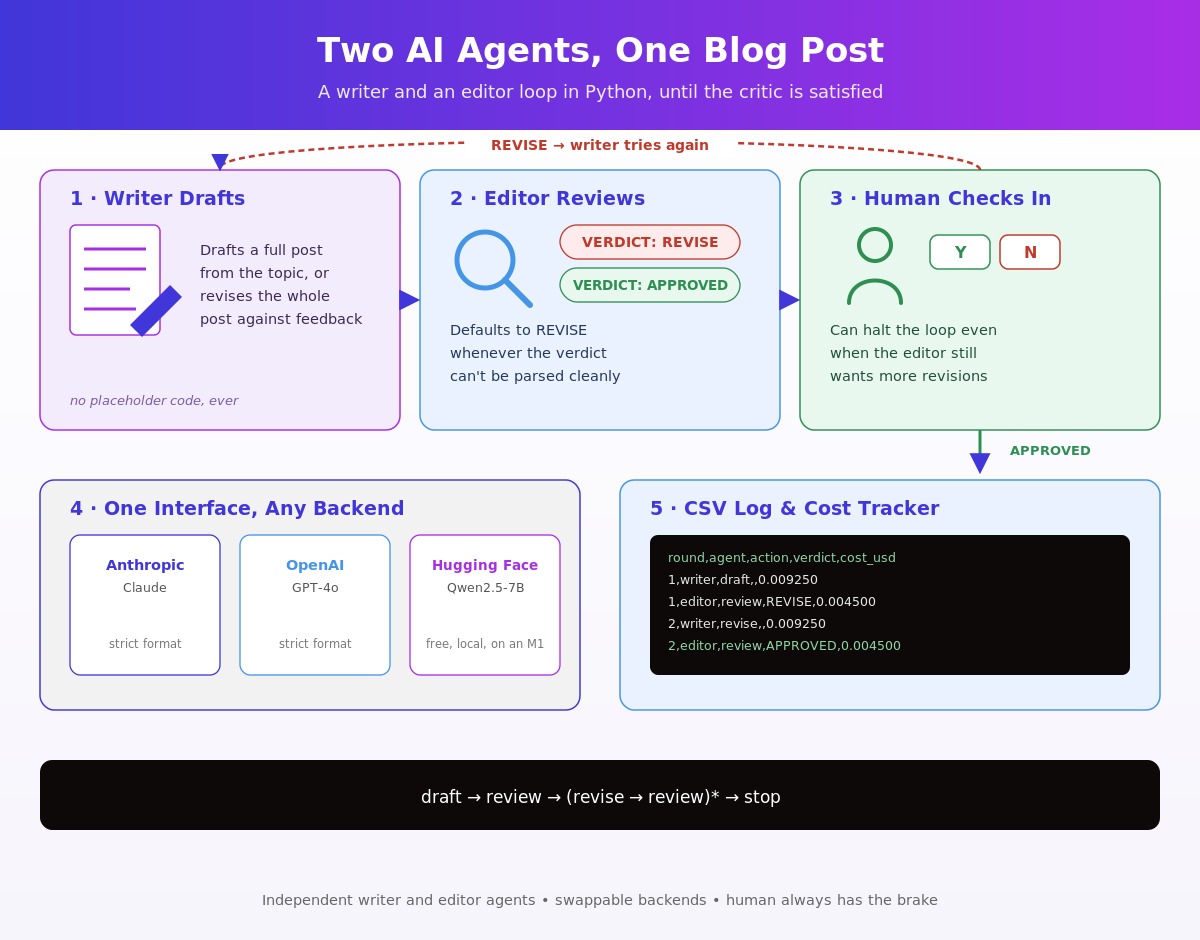
The writer-editor agent loop is a two-agent critique-and-revise pattern: one agent writes a technical post, a second agent reviews it and hands back detailed feedback, and the writer revises. Round and round, until the editor approves the draft, a human stops the loop, or we hit a sensible cap. Nothing exotic — just two roles, a feedback loop, and a paper trail.
This post walks through a self-contained Python implementation. The implementation runs on three different backends without changing a line of the agent logic: the Anthropic API, the OpenAI API, and a free, open-source Hugging Face model that fits on an M1 laptop. The full script is agents.py, and this post is really its companion.
If you want to skip ahead, the loop is: draft → review → (revise → review)* → stop. The rest is plumbing, and the plumbing is where the interesting decisions live.
Architecture: A Shared LLM Backend Interface for Writer and Editor Agents
Two agents, one shared interface, one orchestrator holding the loop together.
The writer and the editor are deliberately independent. They do not share memory, they do not see each other’s system prompts, and they only communicate through text that the orchestrator passes between them. That independence matters: it means the editor cannot quietly collude with the writer, and it means you can swap either agent’s model without touching the other.
LLMBackend is a minimal abstract interface that lets the writer and editor call any LLM provider — Anthropic, OpenAI, or a local Hugging Face model — through the same two methods, so swapping providers requires no change to the agent logic itself. A backend takes a system prompt and a user prompt and returns the model’s text and the token usage for that call. Bundling usage into the return value is what makes cost tracking painless later — the count comes back from the same call that produced the text, so nothing has to be re-derived.
from abc import ABC, abstractmethod
from dataclasses import dataclass
from typing import Tuple


@dataclass
class Usage:
    """Token counts for a single model call."""

    input_tokens: int = 0
    output_tokens: int = 0

    def __add__(self, other: "Usage") -> "Usage":
        return Usage(
            self.input_tokens + other.input_tokens,
            self.output_tokens + other.output_tokens,
        )


class LLMBackend(ABC):
    """A minimal, uniform interface every provider must satisfy."""

    name: str = "base"
    model: str = "base"

    @abstractmethod
    def generate(self, system: str, user: str, max_tokens: int = 2048) -> Tuple[str, Usage]:
        """Return (text, Usage) for a system + user prompt."""
        raise NotImplementedError
Keep this small and the agents stop caring which model sits underneath. That is the point of the whole exercise — the agents describe behaviour, the backend supplies capability, and the two never leak into each other. The model attribute is the only extra: we need it to price the tokens.
Implementing the WriterAgent and EditorAgent Classes in Python
🔒 Subscribe to keep reading.
Human-in-the-Loop Control for the Writer-Editor Revision Loop
🔒 Subscribe to keep reading.
Logging Agent Actions to CSV with Python’s csv Module
🔒 Subscribe to keep reading.
Tracking Token Usage and Cost per LLM API Call
🔒 Subscribe to keep reading.
Further Optimisation: Prompt Caching for Multi-Round Loops
🔒 Subscribe to keep reading.
Interchangeable LLM Backends: Anthropic, OpenAI, and Hugging Face
🔒 Subscribe to keep reading.
Backend Comparison: Anthropic vs OpenAI vs Hugging Face
🔒 Subscribe to keep reading.
Key Takeaways: Building a Writer-Editor Agent Loop in Python
🔒 Subscribe to keep reading.
References
🔒 Subscribe to keep reading.
You've hit a Deep Dive tutorial.
I spend dozens of hours researching, coding, and breaking things to write these guides. This content is free, but reserved for my subscriber community. Drop your email below to unlock this guide (and all past/future deep dives):
Full content temporarily unavailable — refresh in a moment
Already a subscriber? Use the magic link from your last newsletter, or reset your password.
Log in to unlock
New subscribers get an inbox mail: Set a password to unlock articles. The form does not log you in — use the same email afterwards.