Elena' s AI Blog

Virtual Presenters (AI Avatars in-depth)

31 Mar 2024 (updated: 02 May 2026) / 19 minutes to read

Elena Daehnhardt


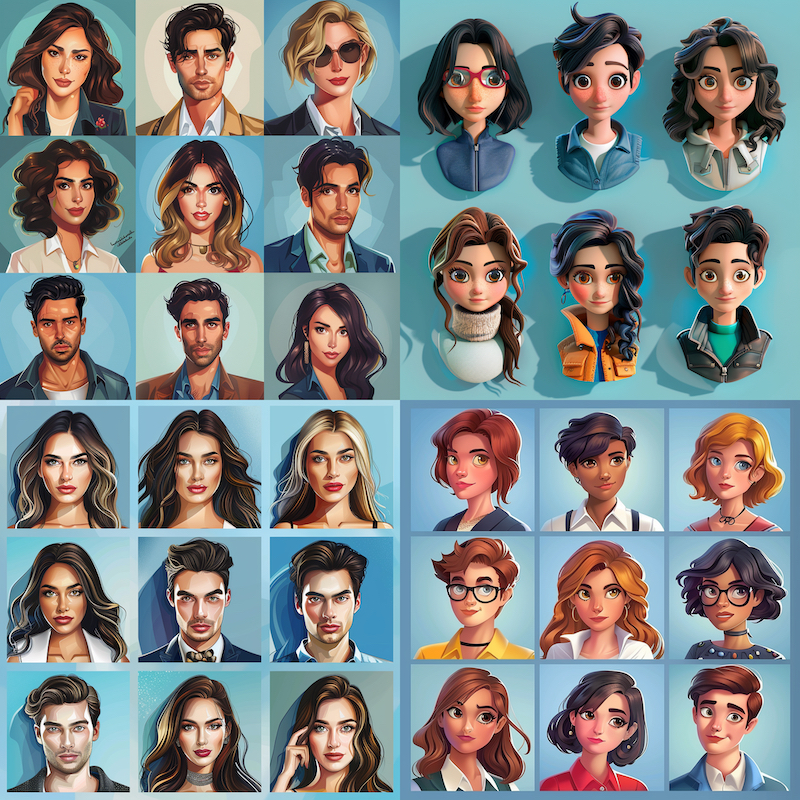
Midjourney AI art, March 2024


If you click an affiliate link and subsequently make a purchase, I will earn a small commission at no additional cost (you pay nothing extra). This is important for promoting tools I like and supporting my blogging.

I thoroughly check the affiliated products' functionality and use them myself to ensure high-quality content for my readers. Thank you very much for motivating me to write.


TL;DR:
  • AI avatars use GANs and deep learning to simulate human presenters. Platforms like Synthesia, DeepBrain, and HeyGen let you generate videos from text, while Python libraries like py-avataaars let you script simple 2D avatars locally.

Introduction

This post will briefly introduce AI-powered tools like Synthesia.io that produce incredible avatars.

AI Avatars

AI avatars, also known as virtual humans or digital humans, are computer-generated representations of humans that are increasingly being used in various applications.

How they are created

Avatars are created using artificial intelligence techniques, such as machine learning and deep learning, to simulate the human appearance, behaviour, and interaction.

Deep learning is a type of machine learning that uses Artificial Neural Networks to learn from data. Neural networks are inspired by the structure of the human brain, and they can learn to perform complex tasks such as image recognition and natural language processing.

Do you want to know how does Deep Learning differ from Machine Learning? Read my first post Deep Learning vs Machine Learning

One way to create sophisticated AI avatars using deep learning is to use a generative adversarial network (GAN). GANs are a neural network consisting of two competing networks: a generator and a discriminator. The generator creates new data, such as images or videos. The discriminator is responsible for identifying whether the data is real or fake.

I have asked Google Gemini:

The concept of Generative Adversarial Networks (GANs) was introduced by Ian Goodfellow and his colleagues in their landmark 2014 paper. If you want to dive into the history, the Transcript: AI Breakthroughs with Ian Goodfellow and Richard Mallah (2017) from the Future of Life Institute is a fantastic listen. It also points to practical resources like An introduction to Generative Adversarial Networks (with code in TensorFlow) and the foundational Deep Learning book.

GANs can be used to create AI avatars that are more realistic and lifelike than those made using traditional methods. For example, GANs can create avatars capable of expressing emotions and interacting with their environment. Read related research paper by Abinaya and Vadivu (2024) Enhancing the Potential of Machine Learning for Immersive Emotion Recognition in Virtual Environment.

Why use them?

AI avatars shine when you need scalable, personalised video content but lack a studio budget or human actors. The most common uses today include:

  • Marketing and advertising: running personalised campaigns or operating 24/7 customer service kiosks.
  • Education and training: developing immersive corporate training simulations where the presenter can dynamically adapt or speak multiple languages.
  • Entertainment: powering virtual worlds, gaming NPCs, and media production.

The appeal is straightforward: they are cost-effective, you can update a video simply by changing the text script (no reshoots required), and they can instantly translate your message into dozens of languages. They are still evolving, but they are already changing how we produce digital content.

Next, we will explore the leading platforms that let you create these avatars today.

Synthesia AI

Synthesia.io is arguably the most well-known cloud-based platform for this. You type a script, choose an avatar, and it generates a video with a realistic human presenter and voice.

What I appreciate about their approach is how much it resembles editing a slide deck. You do not need video production skills; you just arrange elements on a canvas. They support over 120 languages and let you add subtle micro-gestures (nods, raised eyebrows) to make the avatars feel less rigid.

To understand why companies adopt this, look at how they use it (from their case studies):

  • Localization at scale: Companies like Electrolux create a single training video in English, then click a button to localize it into 30+ European languages, complete with matching lip-sync.
  • Cost and time reduction: LATAM Airlines and Berlitz both replaced massive video production pipelines with AI generation. Berlitz reduced production time for 1,700 micro-videos by 70% and cut their team size requirement significantly.
  • Updating content: When a product feature changes, Zoom or Persado can simply edit the text script and regenerate the video. No need to bring a presenter back into a studio to re-record a single sentence.

How is it done?

Synthesia.io creates its avatars using neural networks. To generate high-quality and personalized avatars, you are suggested to provide approximately 15 minutes of footage while standing in front of a green screen. After receiving the footage, Synthesia.io spends approximately two weeks training its models to create a new custom avatar specifically for you.

The technology used by Synthesia.io is proprietary, and only a few details are shared about it. Their work involves a lot of research on photorealistic and controllable neural video synthesis. Synthesia.io works with their co-founders, Prof. Matthias Niessner (TUM) and Prof. Lourdes Agapito (UCL), to conduct foundational research for developing 3D neural rendering techniques to synthesize realistic video. You can find more information about their work on their website, Welcome to Synthesia AI Research.

Alternatives

There are several alternatives to Synthesia.io, each with strengths and weaknesses. Here are a few of the most popular options:

  • D-ID revolutionizes the way we interact with digital devices, making communication more natural and intuitive. With this interface, users can engage in face-to-face conversations with technology, without the need for typing or clicking.

Creating D-ID agents is a simple process. You will need to select the appearance and voice settings for your agent, upload your text or PDF file to customize it to your specific needs, and provide instructions on how to behave. You will be given some free credits to try it out and see if you like it.

Personally, I am fond of the selection of voices and avatars available. However, I would love to see the avatars capable of understanding my speech and communicating with me. The technology for this already exists, and it would make me even happier to have this option for my future agents.

My first D-ID avatar, Agent 001

My first D-ID avatar, Agent 001

  • Rephrase.ai is a powerful AI platform that enables users to transform plain text into engaging videos. It has many advanced features, such as adding music, transitions, and effects to your videos. Rephrase.ai is ideal for users looking for a high level of control and customization options for their videos.

  • Hour One AI is a platform for creating synthetic videos that utilises artificial intelligence. It comes with various features, including the capability to generate videos in various languages. Hour One AI is an excellent choice for companies looking to produce multilingual videos.

  • Hey Gen is an AI-powered video generator that can transform marketing text into engaging videos. Hey Gen provides a wide range of features, such as customised backgrounds and graphics, to create high-quality marketing videos. It is an excellent choice for businesses looking to produce professional video content. %;

  • Fotor AI creates avatars or faces using the respective Web Interface at Avatar Maker and AI Face Generator. Additionally, Fotor offers powerful AI tools to enhance photos, remove backgrounds and unwanted objects, and even generate images from text. Transform blurry photos, change backgrounds, and remove distractions with ease.

  • Deepbrain AI is an advanced platform that allows users to create realistic-looking AI-generated videos. It offers a wide range of features, including creating videos with custom avatars and micro-gestures. This platform is an excellent option for businesses that need to produce high-quality, captivating videos.

DeepBrain's Template UI for Work Guide

DeepBrain's Template UI for Work Guide

I really enjoy using DeepBrain virtual presenters because of the option to add gestures between specific sentences. The customization options are vast, which makes it a fun and engaging experience. Additionally, you can easily create images and videos from your text to include in your presentation.

  • BHuman AI Studio is a powerful platform for creating realistic AI-generated videos for e-learning, product demos, and marketing purposes. It provides a range of features that enable users to create videos with custom avatars, backgrounds, and graphics. This platform is an excellent option for businesses and individuals who want to create engaging and informative videos.

  • Photoleap is an application that uses AI to create avatars from your selfies. It’s an avatar-creating app and a powerful photo editing tool that can transform any photo into a digital artwork. With Photoleap, you can describe anything by clicking on the generate button, and the AI will create an image for you in just a few seconds. The app lets you turn your words into art on your phone. Additionally, you can draw anything on your mind and add a short prompt, and our AI will fill in the gaps to create your image. See Transform your selfies into avatars instantly with AI Selfies

Avatars in Python

Py-Avataaars at pypi

You can create a simple “toy” avatar in Python. There are a few different libraries that you can use to do this, but one of the most popular is called Py-Avataaars. Py-Avataaars is a Python library that provides a simple interface for creating and rendering avatars. It uses a pre-trained model to generate the avatars, and you can customise them with various parameters, such as skin colour, hair colour, and hairstyle.

Install it with pip:

pip install py-avataaars

Here is an example of how to create an avatar using Py-Avataaars:

import py_avataaars as pa

avatar = pa.PyAvataaar(
    style=pa.AvatarStyle.CIRCLE,
    skin_color=pa.SkinColor.LIGHT,
    hair_color=pa.HairColor.AUBURN,
    facial_hair_type=pa.FacialHairType.DEFAULT,
    top_type=pa.TopType.LONG_HAIR_CURVY,
    hat_color=pa.Color.RED,
    mouth_type=pa.MouthType.TWINKLE,
    eye_type=pa.EyesType.WINK,
    eyebrow_type=pa.EyebrowType.DEFAULT,
    nose_type=pa.NoseType.DEFAULT,
    accessories_type=pa.AccessoriesType.SUNGLASSES,
    clothe_type=pa.ClotheType.GRAPHIC_SHIRT,
    clothe_color=pa.Color.BLACK,
    clothe_graphic_type=pa.ClotheGraphicType.BEAR,
)

# You can save into PNG or SVG file
avatar.render_svg_file("my_avatar.svg")

This code will create an avatar with defined parameters and save it as a SVG image called “my_avatar.svg”.

PyAvataaar, a SVG avatar image

PyAvataaar, a SVG avatar image

Stable Diffusion DreamBooth

If you’re looking for more than just simple, static SVG avatars and are willing to put in some effort, check out Pyry Pajunen’s excellent tutorial Easy Realistic Avatars with Stable Diffusion DreamBooth: No-Programming, Step-by-Step Guide (No Third-Party Apps) Pyry Pajunen explaining how to create lifelike avatars using Stable Diffusion DreamBooth, an AI-powered tool that generates accurate avatars with realistic expressions and movements. You can use Google Colab to run the code.

Instruct Pix2Pix

InstructPix2Pix is an incredible AI-powered tool that allows you to edit a picture using plain English instructions. You can write what you want to be changed, for instance, “make the sky red” or “add a cat to the picture,” and the AI will do its best to follow your directions, creating a new image with those changes.

There are two ways to use InstructPix2Pix. Firstly, you can try it out for free via the online demo. For instance, you can play with InstructPix2Pix at HuggingFace Spaces or at replicate.com. All you need to do is upload your picture and type in your instructions. This option is ideal for those who want to give InstructPix2Pix a go without any software installation.

Secondly, for those who are more tech-savvy, you can download the code and run it on your computer. This option offers more control over the editing process.

The complete instruct-pix2pix tutorial is at stable-diffusion-art.com.

There are many options to create fantastic avatars, so I may write about it more in the future.

Best of luck with coding and have fun!

Did you like this post? Please let me know if you have any comments or suggestions.

AI-generated art and music/sound posts that might be interesting for you


Dangers and ethical considerations

The technology behind AI avatars is impressive, but it comes with a heavy set of ethical responsibilities and obvious risks.

The impact on jobs: Will virtual avatars substitute human TV presenters? Personally, I expect to see virtual presenters working in TV shows and other global video content within the next two to five years. The technology is already here. While audiences still crave human connection for emotionally charged content or in-depth interviews, avatars are perfectly suited for routine updates, weather reports, and continuous 24/7 news cycles. We will likely see a hybrid model where humans and avatars share the screen.

Deepfakes and misinformation: The same technology that makes a helpful training avatar can be used to create hyper-realistic videos of real people saying things they never did. The potential to damage reputations, manipulate elections, and undermine trust in media is severe.

Fraud and social engineering: Bad actors can deploy AI avatars to impersonate individuals for phishing or scamming, leveraging the perceived authority of a “human” face on a video call.

Bias and privacy: Generating these avatars requires massive datasets of human faces and voices. If the training data is biased, the resulting avatars will perpetuate stereotypes. Furthermore, the collection of biometric data raises significant privacy and consent issues.

As we adopt these tools, strict regulatory frameworks and clear labeling of synthetic media are becoming essential. We need to be able to trust what we see on our screens.

Conclusion

AI avatars, computer-generated representations of humans, are rapidly gaining traction across various industries, including education, marketing, and entertainment. Synthesia is one of the most impressive tools for creating avatars, alongside other remarkable applications.

In this post, we’ve explored some of the leading AI applications and techniques for crafting avatars, complemented by links to related research and advanced AI avatar creation methods and libraries accessible to all.

As these technologies continue to evolve, the potential for more realistic and interactive avatars promises to unlock unprecedented opportunities in how we learn, market products, and entertain ourselves.

Remember, as we explore the possibilities offered by AI avatars, we must consider ethical considerations to ensure the respectful and responsible use of this powerful technology.

Stay updated on the latest AI avatars and other innovations I learn by signing up for our newsletter.

Try the following fantastic AI-powered applications.

I am affiliated with some of them (to support my blogging at no cost to you). I have also tried these apps myself, and I liked them.

Deepbrain AI helps to create videos faster with AI-powered video editing that features realistic AI avatars, natural text-to-speech, and powerful text-to-video capabilities.

Hey Gen uses text-to-video generator technology that allows you to easily create, manage, and streamline cinematic AI avatar videos.

Hour One AI uses text-to-video generator technology that allows you to easily create, manage, and streamline cinematic AI avatar videos.

Pictory.ai creates professional quality videos from your script with realistic AI voices, matching footage and music in a few clicks. Pictory.AI can also convert blog posts into captivating videos and extract highlights from your recordings to create branded video snippets for social media, and much more.

Synthesia.io can generate videos from text prompts, creates AI avatars and much more.

vidIQ helps to grow YouTube channels with optimised content and keyword generation.

References

1. Artificial Neural Networks

2. Deep Learning vs Machine Learning

3. Transcript: AI Breakthroughs with Ian Goodfellow and Richard Mallah

4. An introduction to Generative Adversarial Networks (with code in TensorFlow)

5. Deep Learning book.

6. Enhancing the Potential of Machine Learning for Immersive Emotion Recognition in Virtual Environment

7. Synthesia.io

8. Discover AI video success stories

9. Welcome to Synthesia AI Research

10. D-ID

11. Rephrase.ai

12. Hour One AI

13. Hey Gen

14. Fotor AI Avatar Maker

15. Fotor AI Face Generator

16. Deepbrain AI

17. BHuman AI Studio

18. Photoleap

19. Photoleap

20. Transform your selfies into avatars instantly with AI Selfies

21. Py-Avataaars

22. Easy Realistic Avatars with Stable Diffusion DreamBooth: No-Programming, Step-by-Step Guide (No Third-Party Apps) Pyry Pajunen

23. Google Colab example code using DreamBoot Stable Diffusion

24. HuggingFace Spaces

25. replicate.com.

26. Instruct Pix2Pix: Edit and stylize photos with text

desktop bg dark

About Elena

Elena, a PhD in Computer Science, simplifies AI concepts and helps you use machine learning.

Citation
Elena Daehnhardt. (2024) 'Virtual Presenters (AI Avatars in-depth)', daehnhardt.com, 31 March 2024. Available at: https://daehnhardt.com/blog/2024/03/31/ai_avatars_synthesia_ai/
All Posts