Working With a 1M-Token Context Window: Practical Patterns for Claude Sonnet 5
The first time I had a full 1M-token window available, I did the obvious thing: I pasted an entire repository into a single prompt and asked Claude Sonnet 5 to find a bug. It found it, eventually, after a slower and less confident pass than I expected from a model this capable. That was my first real lesson about the 1 million token context window — having the room does not mean you should fill it.
Claude Sonnet 5 ships with a 1M-token context window by default, no beta header, no smaller variant to opt out of. That is genuinely useful. It is also easy to misuse. This post is about the patterns I now reach for when I am actually building something against that window, rather than just marvelling at the number.
What the 1M-Token Window Actually Gives You
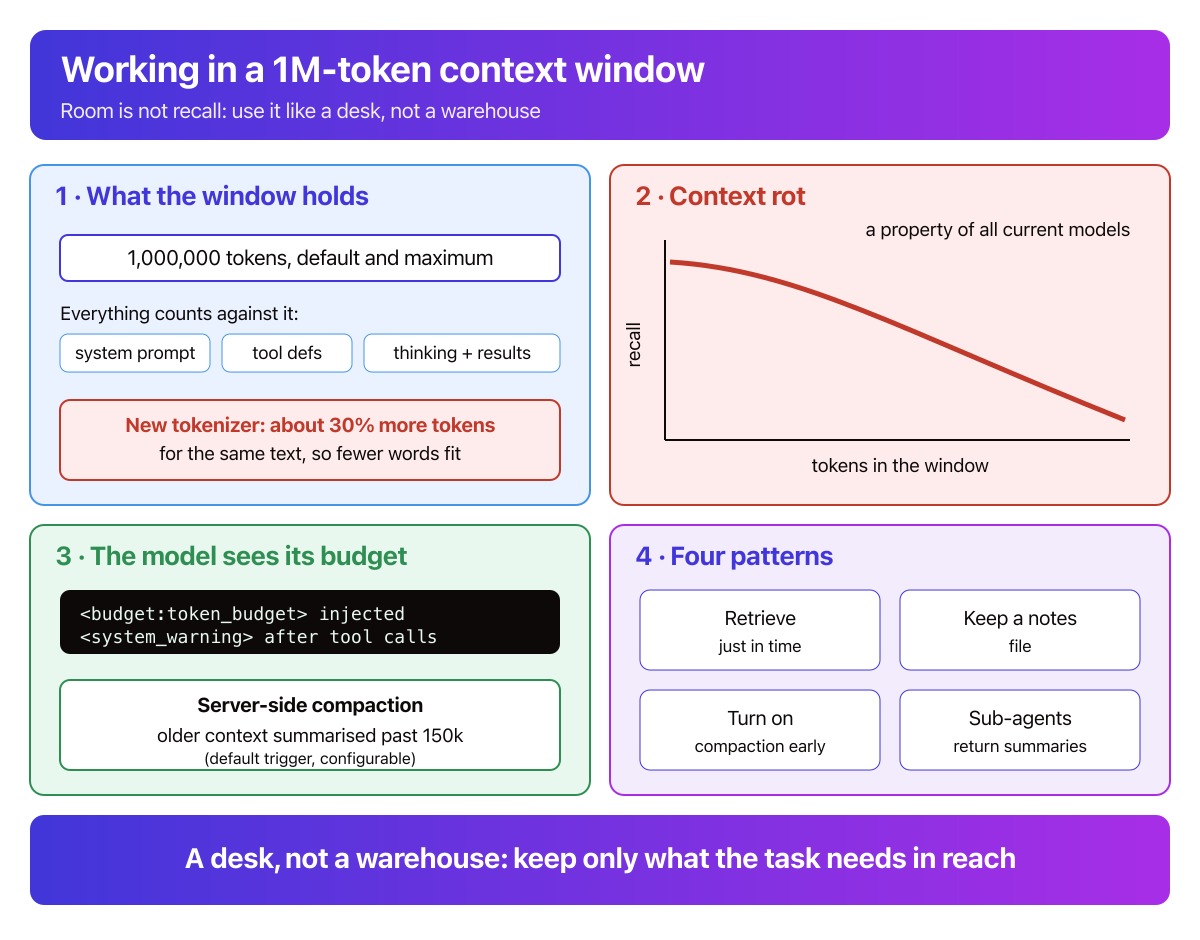
For Claude Sonnet 5, 1M tokens is both the default and the maximum context window — there is no smaller variant to request instead. You do not need a beta header to use it, and Anthropic bills long-context requests at standard pricing, currently $2 per million input tokens and $10 per million output tokens, with no long-context surcharge. A single request can also carry up to 600 images or PDF pages, compared with 100 on models still capped at 200k tokens.
There is a catch worth knowing before you budget anything against that figure. Sonnet 5 uses a new tokenizer, and the same input text now produces roughly 30% more tokens than it did under Sonnet 4.6. I covered this in more detail in my look at Sonnet 5’s tokenizer tax when it launched; the short version is that a token now buys less text than it used to. By my own rough maths — roughly 4 characters per token, adjusted for the 30% inflation — 1M tokens holds somewhere around half a million words of combined prompt and response, fewer than the same token count bought under the old tokenizer. Treat that as an estimate, and recount your own prompts with the token counting API if the number matters to you.
Everything counts toward that window, not just your message text: the system prompt, tool definitions, thinking tokens, and tool results all draw from the same budget.
Context Rot: Why More Tokens Is Not Automatically Better
Anthropic’s own engineering team has a name for the failure mode a bigger window does not fix: context rot — as the number of tokens in a context window grows, a model’s ability to accurately recall information from that context decreases. This is not specific to Sonnet 5. It is a consequence of how transformer attention works: every token can attend to every other token, so the pairwise relationships a model tracks grow with the square of the context length. A million tokens is not just more to read — it is more for the model to weigh against everything else in view at once.
Anthropic frames context as a finite resource with diminishing marginal returns: good context engineering means finding the smallest set of high-signal tokens that gets you the outcome you want, not the largest set you can fit. That is the opposite of how a 1M-token window instinctively makes you behave. A bigger window tempts you to stop curating. Context rot is the reason you should not.
Context Awareness: Sonnet 5 Tracks Its Own Budget
One genuinely new capability worth knowing about: Claude Sonnet 5 has context awareness. The API automatically injects a tag at the start of every request telling the model its total token budget:
<budget:token_budget>1000000</budget:token_budget>
Then, after every tool call, it injects an update on what remains:
<system_warning>Token usage: 350000/1000000; 650000 remaining</system_warning>
You do not enable this — there is nothing to configure, and you never send these tags yourself. Sonnet 5, Sonnet 4.6, Sonnet 4.5, and Haiku 4.5 all support it. In practice, a long-running agentic task can reason about its own remaining budget and start wrapping up gracefully rather than running blind until it hits a hard limit. I would not rely on this alone for anything expensive, but it is worth mentioning explicitly in a system prompt for agents that run long tool-use loops — telling the model it can check its own budget changes how it paces itself.
Four Practical Patterns for Working Inside 1M Tokens
These are the patterns I actually reach for, in roughly the order I try them.
1. Retrieve just-in-time instead of loading everything up front
The instinct with a 1M-token window is to pre-load everything relevant. Anthropic’s guidance pushes the other way: maintain lightweight identifiers — file paths, stored queries, links — and load the actual content only when the model needs it, the way Claude Code uses grep and glob to navigate a codebase rather than reading it all in up front. Slower per step than one giant prompt, but the working set stays small and relevant instead of large and diluted.
2. Keep a running notes file for long tasks
For anything spanning more turns than fit comfortably in one window, have the agent write its own progress notes to a file outside the conversation — decisions made, open questions, what has already been tried — and read them back in when a new session starts. This is the same pattern behind Anthropic’s memory tool, and it works even without that specific tool: a plain NOTES.md the agent is instructed to maintain does most of the job.
3. Turn on server-side compaction before you need it
When a conversation is going to run long regardless of how carefully you curate it, server-side compaction is the lowest-effort fix. With the compact-2026-01-12 beta header enabled, Claude automatically summarises older context once input tokens cross a trigger threshold you set — 150,000 tokens by default — and continues the conversation from that summary instead of the full history.
pip install anthropic
The example below needs a live Anthropic API key, so I have syntax-checked it against the current compaction docs but not executed it end to end.
import anthropic

client = anthropic.Anthropic()
messages = [{"role": "user", "content": "Summarise every open PR description in this repo"}]

response = client.beta.messages.create(
    betas=["compact-2026-01-12"],
    model="claude-sonnet-5",
    max_tokens=4096,
    messages=messages,
    context_management={
        "edits": [
            {
                "type": "compact_20260112",
                "trigger": {"type": "input_tokens", "value": 150000},
            }
        ]
    },
)

# Append the response (including any compaction block) to continue the conversation
messages.append({"role": "assistant", "content": response.content})
Two things caught me out when I first tried this. First, compaction uses the same model for summarisation as the rest of the request — no option to hand it off to something cheaper. Second, if your request includes tools, the model can occasionally try to call one during the summarisation step instead of writing a summary; Anthropic’s fix is to pass explicit instructions telling it not to call any tools while summarising.
4. Delegate exploration to sub-agents, keep only the summary
For research or discovery-heavy tasks, a lead agent that stays lean and coordinates specialised sub-agents tends to outperform a single agent trying to hold everything itself. Each sub-agent can spend tens of thousands of tokens exploring in its own clean context window, then return only a condensed summary — often a couple of thousand tokens — to the lead agent. Anthropic describes this in its write-up on the multi-agent research system behind Claude’s research features, and it is the pattern I reach for whenever a task naturally splits into independent lines of investigation.
A Desk, Not a Warehouse: A Mental Model for the Context Window
I think of the context window as a desk, not a warehouse. A warehouse stores an enormous amount without anything on the shelves interfering with anything else — you go and find what you need, and the rest sits quietly until you do. A desk is different. Everything on it is in view at once, competing for the same space and your attention. A bigger desk lets you spread more papers out before things slide onto the floor, but past a certain point, more papers just means longer to find the one you need — and a higher chance you knock something off without noticing. Sonnet 5 gave you a much bigger desk. It did not give you a warehouse with a librarian. Curating what is actually on the desk is still your job.
Checklist: Working With Sonnet 5’s Context Window
If you remember nothing else from this post:
- Recount your prompts under Sonnet 5’s tokenizer — a budget calibrated against Sonnet 4.6 will be roughly 30% too optimistic.
- Don’t pre-load everything just because there is room. Retrieve just-in-time where you can.
- For long-running agentic tasks, have the agent keep its own notes file rather than relying on the raw history to carry state.
- Turn on server-side compaction before a conversation gets long enough to need it, not after.
- Split independent exploration across sub-agents and keep only their summaries in the lead agent’s context.
- Lean on context awareness in your system prompt — tell the model it can check its own remaining budget and pace itself accordingly.
Final Thoughts
A 1 million token context window is a genuinely useful capability, and I am glad Sonnet 5 ships it as the default rather than a premium add-on. But the number on the box was never the whole story. Context rot is real, the tokenizer changed what that number actually buys you, and the patterns that make a long context useful — retrieval, note-taking, compaction, delegation — are the same discipline good engineers already apply to any finite resource. Use the room. Just don’t fill it because it’s there.
References
- What’s new in Claude Sonnet 5 — Claude Platform Docs
- Context windows — Claude Platform Docs
- Compaction — Claude Platform Docs
- Token counting — Claude Platform Docs
- Memory tool — Claude Platform Docs
- Effective context engineering for AI agents — Anthropic
- How we built our multi-agent research system — Anthropic
Stay Ahead in AI, Machine Learning & Python
No hype. Weekly notes on AI tools, Python, and what I'm actually building — plus seven free gifts, including Fantastic AI: The 2026 Toolkit and AI Coding Assistant Safety Card.
You're in
Check your inbox for Set a password to unlock articles if you want gated tutorials. Log in with the same email.