I am still working on this post, which is mostly complete.
Thanks for your visit!
TL;DR:
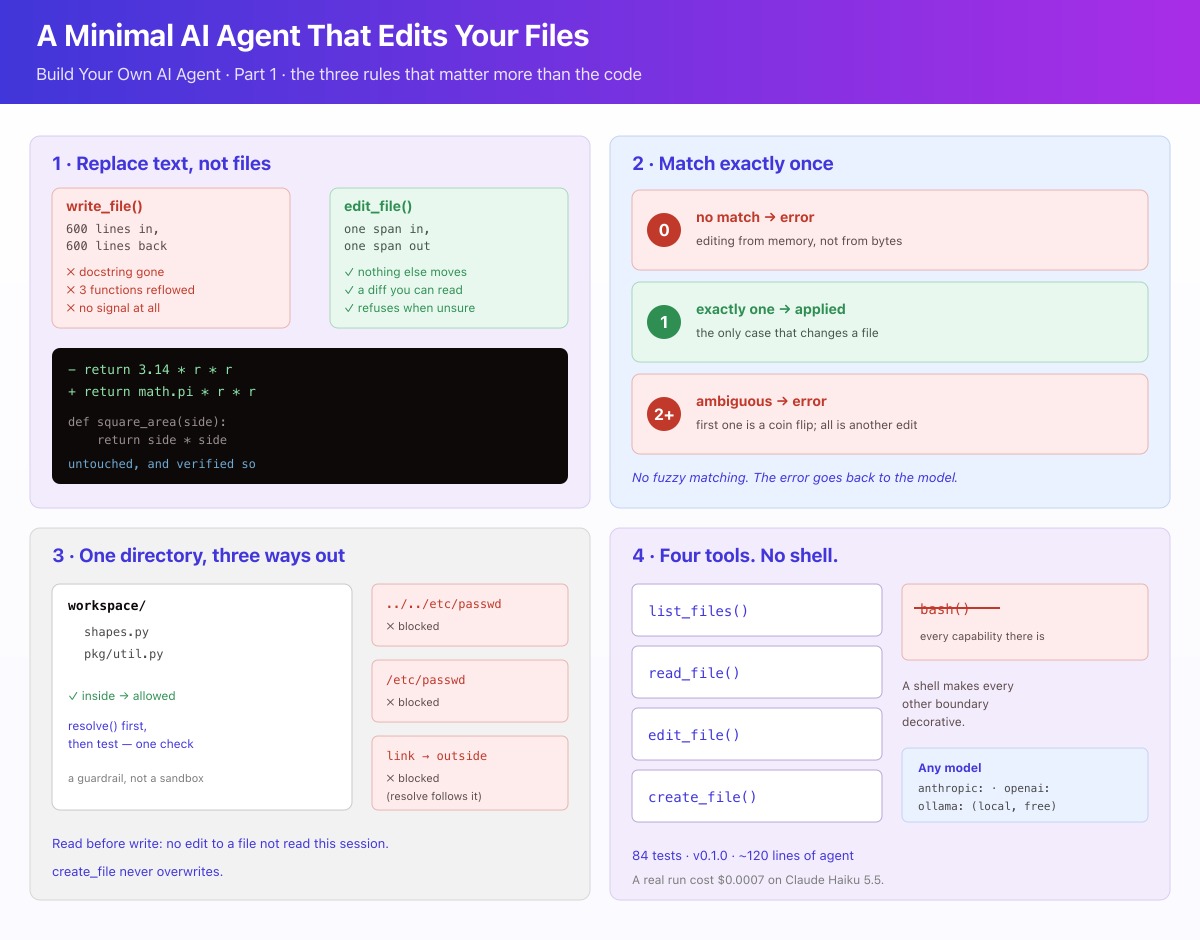
- An agent that edits files needs one primitive done properly: replace an exact span of text that must match exactly once. Whole-file writes lose code silently.
- Zero matches and several matches are both errors, returned to the model rather than guessed at. The error text is the agent's steering wheel.
- Path containment is a single check: resolve the path, then ask whether it still lands inside the workspace. `..`, absolute paths and symlinks all fail it together.
- No shell tool, from the first version. An unrestricted shell can bypass the file tools' restrictions, and path containment becomes decorative.
- Around 120 lines of agent code, 90 tests, and a real run that cost $0.0007 on Claude Haiku 5.5.
📚 This post is part of the "Build Your Own AI Agent" series
I asked an agent to replace a hardcoded 3.14 with math.pi. It read the file, changed one line, and left the function below it alone. Total cost: $0.0007.
That last part — left the function below it alone — is the whole post.
Here is that file, and the diff that edit_file hands back for the change. I ran the tool on this exact file to capture it, so it is real output rather than a mock-up:
# shapes.py, before
importmathdefcircle_area(r):return3.14*r*rdefsquare_area(s):returns*s
--- a/shapes.py
+++ b/shapes.py
@@ -2,7 +2,7 @@


 def circle_area(r):
-    return 3.14 * r * r
+    return math.pi * r * r


 def square_area(s):
One line changed. square_area is not mentioned, because it was never touched. A change that small is what everything below is designed to protect.
This is Part 1 of a six-part series in which I build an AI agent in Python that edits code, prose and data, checks its own work, and stops when a test rather than a model says it is finished. Each part ends with a working agent, tagged in the companion repository edaehn/ai_agent, so the code in a post is a version you can check out rather than a snippet you have to reassemble:
git clone https://github.com/edaehn/ai_agent.git
cd ai_agent && git checkout v0.1.2
This one is v0.1.2: around 120 lines of agent, four tools, and three rules that matter more than any of the code. It is MIT licensed, so take whatever is useful.
It is for you if you write Python, have used a coding assistant, and have wondered what is actually inside one.
What an agent actually is
Before anything else, because the word has been stretched until it means very little.
An agent is a model in a loop with tools. You describe some functions to it — here is read_file, here is what it takes, here is what it returns — and then you ask for something. The model replies either with an answer or with a request to call one of your functions. You run it, hand back the result, and ask again. Round and round, until it stops asking.
That is the whole mechanism. No magic, and almost no code: the loop is about fifteen lines, and a library will write it for you. What you design is the tools — what they do, what they refuse to do, and what they say when they refuse. That is why this post spends its time there.
Diagram 1. The model chooses; the four tools decide what actually happens to your files. There is no shell among them.
What you need
Python 3.11 or newer.pydantic-ai does not support 3.10; I am on 3.13.
One model. Either an API key for a hosted model, or Ollama running locally, which costs nothing and needs no key.
About fifteen minutes.
Setup lives in one place, the repository’s pyproject.toml. From inside the clone you made above, this installs pydantic-ai, the ai_agent package itself (so that python -m ai_agent.agent works) and pytest:
Then one of these, depending on which model you are using. For a hosted model, a key is enough:
export ANTHROPIC_API_KEY=... # or OPENAI_API_KEY
A local model needs three things: the model, a running Ollama server, and the endpoint, because pydantic-ai will not guess it. Leave the endpoint out and building the agent stops with a UserError asking for OLLAMA_BASE_URL.
ollama pull qwen2.5-coder
ollama serve # skip if Ollama is already running; use a second terminal for the restexport OLLAMA_BASE_URL=http://localhost:11434/v1
Local inference has no per-token charge, but it is not free: it spends your own CPU, GPU and electricity. Whether a particular local model copes with exact-match anchors is a question for Part 2, with numbers.
A warning about the hosted route: pydantic-ai builds the provider when you build the agent, not when you send the first request. So a missing key fails immediately, at construction. That is the behaviour you want — you find out before the agent has read half your repository — but it does mean you cannot build an agent for a provider you have no credentials for.
What my last agent post left out
In July I wrote about two agents collaborating on a blog post — a writer and an editor, passing a draft back and forth until the editor approved it. I liked that project. It taught me a lot about loops and about how agreeable a model can be when you ask it to judge its own work.
But it could not hurt anything. The worst outcome was a mediocre draft in a file I had asked for.
Give an agent write access to a directory you care about and the engineering problem changes completely. Not the prompt — the prompt barely changes. What changes is everything around it: what the tools will refuse to do, how an error gets back to the model, and what happens when a confident model is confidently wrong about a file it only half remembers.
So that is where I started. Not with the loop. With the edit.
The one decision everything rests on
Imagine asking someone to fix a typo in a letter. They could correct the word. Or they could retype the whole letter from memory, typo fixed, and hand it back. The second letter will be subtly different everywhere — a changed line break, a dropped comma, a paragraph that reads almost but not quite the same. And you will not notice for a week.
That is the difference between a targeted edit and a whole-file write, and it is the single most important choice in a file-editing agent.
Most agent frameworks hand you a file-writing tool: here is the path, here are the contents, go. Ask a model to change one function in a 600-line module that way and you get 600 regenerated lines back. Somewhere in them, a docstring has vanished. Two unrelated functions have been reformatted. The model will tell you, truthfully as far as it knows, that it updated the function you asked about. The rest only shows up in git diff, if you look.
So the primitive is not “write this file”. It is “replace this exact span of text”, and it must match exactly once:
defapply_edit(text:str,old_text:str,new_text:str,*,path:str="file")->EditResult:"""Replace old_text with new_text, which must match exactly once."""count=text.count(old_text)ifcount==0:raiseEditError(f"old_text was not found in {path}. Read the file again and copy the ""exact text, including indentation and line breaks - do not retype it ""from memory. Whitespace is the usual culprit.")ifcount>1:raiseEditError(f"old_text appears {count} times in {path}, so it is ambiguous. ""Include more surrounding context - the enclosing function signature, ""a nearby comment - so the text you pass matches exactly one place.")new_full_text=text.replace(old_text,new_text,1)returnEditResult(text=new_full_text,diff=unified_diff(text,new_full_text,path))
Both refusals matter, for different reasons.
Zero matches nearly always means the model is editing from its memory of the file rather than from its bytes — a retyped anchor with the indentation slightly wrong. If the tool quietly did nothing, the agent would report success having changed precisely nothing. I have seen that happen. It is maddening, because the transcript looks perfect.
Several matches means the anchor is ambiguous. Replacing the first occurrence is a coin flip. Replacing all of them is a different edit from the one that was requested. Neither is mine to choose.
And there is no fuzzy matching. No closest-match fallback, no whitespace normalisation, no “did you mean”. In my opinion this is not a close call: an agent that can approximately match anchors can approximately destroy code.
Here it is refusing, on a file where two of the three functions call requests.get(..., timeout=30):
>>> from ai_agent.edit import apply_edit
>>> apply_edit(src, "timeout=30", "timeout=90", path="client.py")
EditError: old_text appears 2 times in client.py, so it is ambiguous.
Include more surrounding context - the enclosing function signature, a
nearby comment - so the text you pass matches exactly one place.
Now, an honest note, because I set out to show you a model walking into this and climbing back out. It would not oblige. I tried twice, with files built to invite a short ambiguous anchor, and Claude Haiku 5.5 picked a unique one both times — including the whole line, /orders/ and all, rather than the tempting timeout=30. A capable model told to copy the anchor verbatim mostly does.
So this check is not a thing you will watch fire every day. It is a backstop, and it earns its place in two ways: it turns the rare confident mistake into a corrected second attempt instead of a wrong edit, and it is what makes a smaller local model usable at all — which is Part 2’s problem, and one I will come back to with numbers.
The tool’s job is not to be helpful. It is to be exact, and to complain clearly when it cannot be.
The error message is the steering wheel
Read those two error messages again and notice who they are written for.
Not you. The model.
This is the part I did not expect to matter so much. When a tool refuses, that text goes straight back to the model as the result of its call, and it is the only information the model has about what to do differently. “Invalid input” teaches it nothing; it will try again, identically, until something gives up. “old_text appears 2 times, so it is ambiguous — include more surrounding context” is actionable, and the next attempt is usually right.
In pydantic-ai, that channel has a name:
@agent.tooldefedit_file(ctx:RunContext[Deps],path:str,old_text:str,new_text:str)->str:"""Replace `old_text` with `new_text` in `path`.
`old_text` must appear exactly once in the file - copy it verbatim from
read_file, including indentation. Returns a unified diff of the change.
"""try:result=ctx.deps.workspace.edit_file(path,old_text,new_text)except(WorkspaceError,EditError)asexc:raiseModelRetry(str(exc))fromexcreturnresult.difforf"edited {path} (no textual diff)"
Every refusal in this agent becomes a ModelRetry. The model reads the complaint and tries again, with a budget of three attempts per tool: enough for “add more context” to be recoverable, not enough for a model that keeps repeating the same mistake to repeat it for ever. That budget counts corrections, not spending; the difference matters, and I come back to it in the safety section below.
I write those messages now the way I would write an error for a colleague who cannot see the code. It is a strange skill. It is also most of the difference between an agent that recovers and one that gets stuck.
Below the gate: the directory the agent cannot leave, the read-before-write rule, the four tools in full, a real run with its output, and the section I think matters most — how to use this without regretting it.
One directory, and three ways out of it
🔒 Subscribe to keep reading.
Read before you write
🔒 Subscribe to keep reading.
The whole agent
🔒 Subscribe to keep reading.
The pieces, and how they fit
🔒 Subscribe to keep reading.
Running it
🔒 Subscribe to keep reading.
Testing the rules without a model
🔒 Subscribe to keep reading.
Using this safely
🔒 Subscribe to keep reading.
The short version
🔒 Subscribe to keep reading.
Get the code
🔒 Subscribe to keep reading.
Final thoughts
🔒 Subscribe to keep reading.
References
🔒 Subscribe to keep reading.
You've hit a Deep Dive tutorial.
I spend dozens of hours researching, coding, and breaking things to write these guides. This content is free, but reserved for my subscriber community. Drop your email below to unlock this guide (and all past/future deep dives):
Full content temporarily unavailable — refresh in a moment
You're in
I'll send weekly notes on AI tools, Python, and what I'm actually building. Check your inbox for Set a password to unlock articles — the form does not log you in.
New subscribers get an inbox mail: Set a password to unlock articles. The form does not log you in — use the same email afterwards.
References
About Elena
Elena, a PhD in Computer Science, simplifies AI concepts and helps you use machine learning.
Citation
Elena Daehnhardt. (2026) 'A Minimal AI Agent That Edits Your Files', daehnhardt.com, 19 November 2026. Available at: https://daehnhardt.com/blog/2026/11/19/minimal-ai-agent-that-edits-your-files/
Want the Fantastic AI 2026 toolkit and the Python virtual environments cheat sheet in your inbox?
Fantastic AI: The 2026 ToolkitPython Virtual EnvironmentsPython Errors & Logging
+4more free gifts
You're in
I'll send weekly notes on AI tools, Python, and what I'm actually building. Check your inbox for Set a password to unlock articles — the form does not log you in.