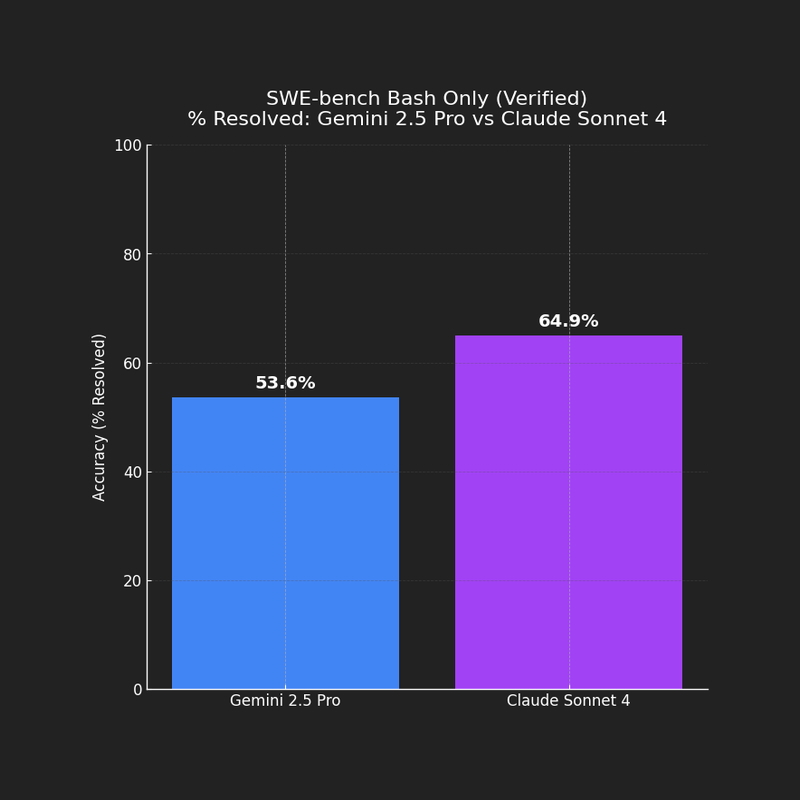
Chart generated with ChatGPT (OpenAI), using SWE-bench Bash Only (Verified) data from
Google DeepMind [14],
Anthropic [15],
and the official SWE-bench site [13].
On SWE-bench Bash Only (Verified), Claude Sonnet 4 outperforms Gemini 2.5 Pro in Python bug-fixing accuracy (≈ 64.9% vs ≈ 53.6%).
But this doesn’t mean Claude is always “better.” Bash Only isolates the language model without external tools or complex scaffolds.
Gemini still offers strengths in speed, huge context windows, and Google Cloud integration.
Benchmarks are helpful yardsticks, not the whole story.
Gemini CLI vs. Claude CLI: Command-Line AI Coding Agents Compared
Command-line AI tools are the new pocket knives of coding life. They live in your terminal, they answer your odd questions at midnight, and they’re becoming essential for developers who want fast help without leaving the shell.
Two strong contenders here are Gemini CLI (Google) and Claude CLI (Anthropic). Gemini CLI and Claude CLI are terminal-based AI coding agents that bring large language models directly into the developer shell for tasks like debugging, refactoring, and multi-step project work.
Both bring large language models into the command line, but with different personalities.
Think of Gemini as the fast multitasker with Google DNA, while Claude plays the thoughtful partner with a safety-first streak.
Let’s explore how to set them up, what they can do, how they treat your data, and how they look when we put them against the same benchmark.
TL;DR
Gemini CLI: fast, integrates well with Google Cloud, context window up to 1M tokens, but data may be used for model improvement unless disabled.
Claude CLI: excels at multi-step (agentic) reasoning, stronger default privacy, slightly higher coding accuracy on SWE-bench Bash Only (≈ 64.9% vs 53.6%).
Benchmarks: Claude Sonnet 4 leads on raw bug-fixing accuracy, but Gemini brings speed and ecosystem perks.
Practical tip: Try both — they shine in different scenarios and make excellent companions in a developer workflow.
🚀 Gemini CLI
Gemini CLI is Google’s open-source agent that hooks directly into the Gemini models [1], [7], [8]. It’s built for debugging, coding, and problem-solving without leaving your terminal.
☁️ Claude CLI (Claude Code)
🔒 Subscribe to keep reading.
🔒 Privacy and Data Security
🔒 Subscribe to keep reading.
📊 Evidence-Based Comparison
🔒 Subscribe to keep reading.
🐍 Python Integration
🔒 Subscribe to keep reading.
🔒 Subscribe to keep reading.
Key Takeaways: Gemini CLI vs. Claude CLI for Developers
🔒 Subscribe to keep reading.
References
🔒 Subscribe to keep reading.
You've hit a Deep Dive tutorial.
I spend dozens of hours researching, coding, and breaking things to write these guides. This content is free, but reserved for my subscriber community. Drop your email below to unlock this guide (and all past/future deep dives):
Full content temporarily unavailable — refresh in a moment
Already a subscriber? Use the magic link from your last newsletter, or reset your password.
Log in to unlock
New subscribers get an inbox mail: Set a password to unlock articles. The form does not log you in — use the same email afterwards.