Elena' s AI Blog

Git Survival Guide

Elena Daehnhardt

Midjourney AI-generated art
Image credit: Illustration created with Midjourney, prompt by the author.
Image prompt

“An illustration representing cloud computing”

Git Survival Guide

This series is a practical guide to Git and GitHub workflows, with a focus on the issues that actually slow people down: diverged histories, recovery, safe collaboration, and confident troubleshooting.

Series Progress

26 of 26 posts published


All Posts in This Series

Part 0: GIT in 10 minutes

Version control systems are handy to keep track of file versions. This is useful for tracking your code, scripts and text information. Currently, GIT is one of the best open-source and cross-platform version control solutions. It enables distributed repository management; it works fast over HTTP and ssh protocols. GIT is relatively easy to use, with command-line utility or Graphical User Interface.

GIT in 10 minutes

Part 1: Git Commands and a Contribution Workflow

I have created a list of arguably the most useful Git commands and an example contribution workflow. I have also found a great JavaScript application for learning Git branching!

Git Commands and a Contribution Workflow

Part 3: Storing Your Local Project to GitHub

This post shows you how to create a Git repository for your local (Python) project and push it to GitHub using the command line and a personal access token. Following these steps, you can securely host your code on GitHub for easy access and collaboration.

Storing Your Local Project to GitHub

Part 4: Collaboration in GitHub

In this post, I have covered GitHub collaboration when working with other team members. Git branching, forking, pull requests, and issues were briefly explained.

Collaboration in GitHub

Part 5: Leveraging Git Tags

Git tags are useful for marking specific points in a repository's history, such as release points or important milestones. They provide a way to easily reference and access specific versions of your codebase. Let's dive deeper into the details of working with Git tags.

Leveraging Git Tags

Part 6: Git Log

The git log command allows you to view your project's history by listing commits with their authors, dates, and messages. It's essential for debugging, tracking changes, and understanding your project's evolution. It is indeed my favourite Git command.

Git Log

Part 9: Reverting Commits in GitHub

This post is about reverting your changes in GitHub. Sometimes it's good to step back and think about something different, right? With the use of git reset, revert and rebase we can remove changes from commits or even history.

Reverting Commits in GitHub

Part 10: Restoring deleted files in Git

A late-night Wi-Fi glitch wiped a folder of images from my Git repository. Here is exactly how I got them back—and what I learned about navigating Git history along the way.

Restoring deleted files in Git

Part 11: Preserve your local changes on Git Pull

When we get the Git error on pull - your local changes to the following files would be overwritten by merge - it means that you have some uncommitted changes in the working directory. Git cannot perform the merge operation because those changes would be lost or overwritten during the merge process. Read some good solutions to resolve this error while keeping local changes.

Preserve your local changes on Git Pull

Part 12: Git Failed to Push Some Refs

I was away from my big MAC computer and did some repository updates using my laptop. When arriving back, I could not push an update from my big MAC computer. Git updates were rejected because my current branch is behind. That happens quite often when we should integrate the remote changes before pushing git updates. Herein I am sharing possible solutions in detail.

Git Failed to Push Some Refs

Part 17: I have cloned my git repository and landed on main. How to get your branch

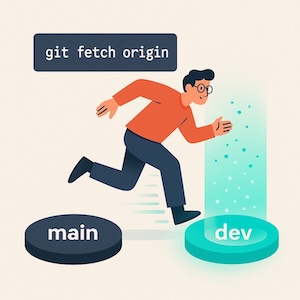
Cloning a repository defaults to the main branch, often leaving developers confused about how to access remote development branches. Here is the architectural reason why, and the two-second command to fix it.

I have cloned my git repository and landed on main. How to get your branch

Part 18: Should you use rebase?

Rebase isn't safer than merge—it's cleaner. Learn when to use Git rebase, how to avoid destroying your team's history, and the disaster recovery commands to undo your mistakes.

Should you use rebase?

Part 19: GitHub Codespaces

GitHub codespaces provide a development environment running in the cloud. A codespace environment is created with the help of configuration files added to a GitHub repository.

GitHub Codespaces

Part 20: Linters and Git Pre-commit

It's great to focus on code development while keeping the coding style right. This could be achieved with automatic formatting checks before committing files into the code repository. In this post, I have described the pre-commit usage with git hooks and a simple setup for checking Python files.

Linters and Git Pre-commit

Part 21: The SSH host key mystery

What do you call a developer who's afraid of the dark? A Git-in-the-middle attacker! But seriously, if you've ever seen a warning message about a changed SSH host key while pushing code changes, don't panic - it might just be a legitimate update. To fix the issue, simply delete the saved RSA key fingerprint and let the SSH client verify the new one. And remember, always keep an eye out for those pesky man-in-the-middle attackers lurking in the shadows! You can learn how to create and use SSH keys, explained so simply in this post.

The SSH host key mystery

Part 22: The Token Way to GitHub Security

In this brief post I describe the setup and usage of GitHub personal access tokens.

The Token Way to GitHub Security

Part 23: Git Remotes

This post is about managing remote repositories in Git. We explore tasks such as adding, renaming, removing remotes, and updating remote URLs. We also practice fetching, pulling, and pushing changes to and from remote repositories.

Git Remotes

Part 24: Git Checkout for overwriting directories from different branches

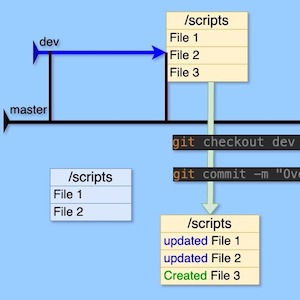
To overwrite the "scripts" directory in the master branch with the files from the "scripts" directory of the "dev" branch, you can use the Git checkout command. Just be cautious, as this will completely replace the files in the destination branch.

Git Checkout for overwriting directories from different branches

Part 25: GitHub Gists

Sharing code snippets via Slack or email can lead to formatting issues. GitHub Gists offers a solution for easily sharing or saving code or text for future use. In this post, I explain how to use Gists effectively.

GitHub Gists

Part 26: Git Stash: The CTRL-Z for Your Working Directory

Git Stash is the temporary clipboard for your code changes. Learn how to stash, pop, and manage work-in-progress efficiently without polluting your commit history.

Git Stash: The CTRL-Z for Your Working Directory

Part 27: Stop Committing Garbage: A Masterclass in .gitignore

A clean repository is a happy repository. In this post, I dive into how to use .gitignore effectively to prevent system files, secrets, and dependencies from polluting your project history.

Stop Committing Garbage: A Masterclass in .gitignore

Part 28: Git Hooks: The Robot Butler for Your Code

Why remember to run tests when a robot can do it for you? In this post, I explain Git Hooks and how to set up simple automations that ensure you never commit broken code again.

Git Hooks: The Robot Butler for Your Code

Part 29: Type Less, Do More: My Top 10 Git Aliases

If you type 'git checkout' fifty times a day, you're wasting time. In this post, I share my personal list of Git aliases that help me work faster and smarter.

Type Less, Do More: My Top 10 Git Aliases

Part 30: Git Cherry-Pick: The Surgeon's Knife

merging takes everything. Rebase rewrites everything. But sometimes, you just want that ONE bug fix from the development branch applied to production. That's where git cherry-pick comes in.

Git Cherry-Pick: The Surgeon's Knife

Part 31: Testing Blog Designs with Git Branches and GitHub Pages

Did you know you can publish different versions of your GitHub Pages blog on separate branches and preview them live before committing to a design? Here is how I do it.

Testing Blog Designs with Git Branches and GitHub Pages

Part 32: Live Design Testing with GitHub Pages and a Custom Domain

Want to preview two completely different blog designs at domain.com/test1 and domain.com/test2 while keeping your main blog running perfectly? Here is how to do it with two extra GitHub repositories — no downtime, no risk.

Live Design Testing with GitHub Pages and a Custom Domain

Getting Started

New to Git? Start with Part 0: GIT in 10 minutes.

All Posts